

In January 2026, not one of my clients had asked me about AI search. The first one did around May. Six months later, it comes up on every client call, and nobody asks about SEO without asking about AI search immediately after.
So, how does a B2B website get cited by AI search?
Four things:
- AI crawlers can reach your pages
- Those pages answer buyer questions directly and specifically
- The rest of the web agrees with what you say about yourself
- Someone is measuring whether any of it works
Every check in this GEO and AEO checklist tests one of those four things. Run it once as a GEO audit, then again every quarter.
First, a quick word on the name. GEO, AEO, AI SEO: three labels, one job. Google's guide to optimizing for generative AI features says that from its side, optimizing for generative AI search is still SEO. I think that's right, and it's a useful filter. Anyone selling you a secret AI-only trick is selling you something Google says it ignores.
The same guide also calls lists like "7 tips for first-time homebuyers" commodity content. Yes, I see the irony in publishing 20 checks. So every check here earns its spot the same way: a place to look, and a test you can run. If a check doesn't change anything on your site, skip it.
One more rule: run them in order, because if AI crawlers can't get into your site, nothing in checks 6 to 20 matters.
AI search can't cite a page it can't reach
These are the boring ones (sorry). They're also where a single wrong setting removes you from AI answers entirely, no matter how good your content is.
1. Your site is still included in Google's generative AI features
Since August 31, 2026, every Search Console property has a Search generative AI control. The default is to include your site. Switch it to exclude, and your links and content disappear from AI Overviews, AI Mode, and generative AI features in Discover.
It doesn't touch AI training. This switch only decides whether you show up.
The test: in Search Console, go to Settings, then Search generative AI, and confirm it says include. If you use URL-prefix properties for subfolders like /blog, check those too, because a child property can override its parent.
2. Search crawlers are allowed, whatever you decide about training
This is the most misunderstood part of AI visibility. It sounds more complicated than it is: each AI company runs separate bots for training and for search, and you control them separately.
OpenAI uses OAI-SearchBot for ChatGPT search and GPTBot for training. Sites that block OAI-SearchBot won't be shown in ChatGPT search answers. Blocking GPTBot only tells OpenAI not to use your content to train its models.
Anthropic splits it the same way: ClaudeBot for training, Claude-SearchBot for search indexing, and Claude-User for fetches a person asks for. Blocking Claude-SearchBot can reduce your visibility in Claude's search results.
| Company | Search bot (keep allowed) | Training bot (your call) |
|---|---|---|
| OpenAI | OAI-SearchBot | GPTBot |
| Anthropic | Claude-SearchBot | ClaudeBot |
Translation: a B2B company that doesn't want its content in training data can still be citable. The robots.txt for that looks like this:
User-agent: OAI-SearchBot
Allow: /

User-agent: Claude-SearchBot
Allow: /

User-agent: GPTBot
Disallow: /

User-agent: ClaudeBot
Disallow: /
The test: open yourdomain.com/robots.txt and look for any Disallow rule under OAI-SearchBot or Claude-SearchBot, or a blanket rule under User-agent: * that blocks everything.
On Webflow
Check Site settings, then SEO, then the Traffic control toggles under Indexing. Webflow allows search engine crawlers and AI bots by default. So if they're off, someone turned them off. (Worth finding out who.)

3. Your firewall isn't blocking what robots.txt allows
Robots.txt is a request. A firewall is a wall.
If the wall says no, the bot never reads your robots.txt.
In July 2025, Cloudflare started blocking AI crawlers by default for new domains. Its defaults have changed since. Which is exactly why you check the setting instead of assuming. OpenAI also recommends allowing requests from its published IP ranges, so bot rules that block by IP can shut out OAI-SearchBot even when robots.txt welcomes it.
The test: if anything sits between your site and the internet, like a CDN, a WAF, or a bot-protection service, open its bot settings and look for AI crawler rules. If you can read your server or CDN logs, search for OAI-SearchBot and Claude-SearchBot and check whether those requests return 403 errors.
4. Your key content is in the HTML, not loaded by a script
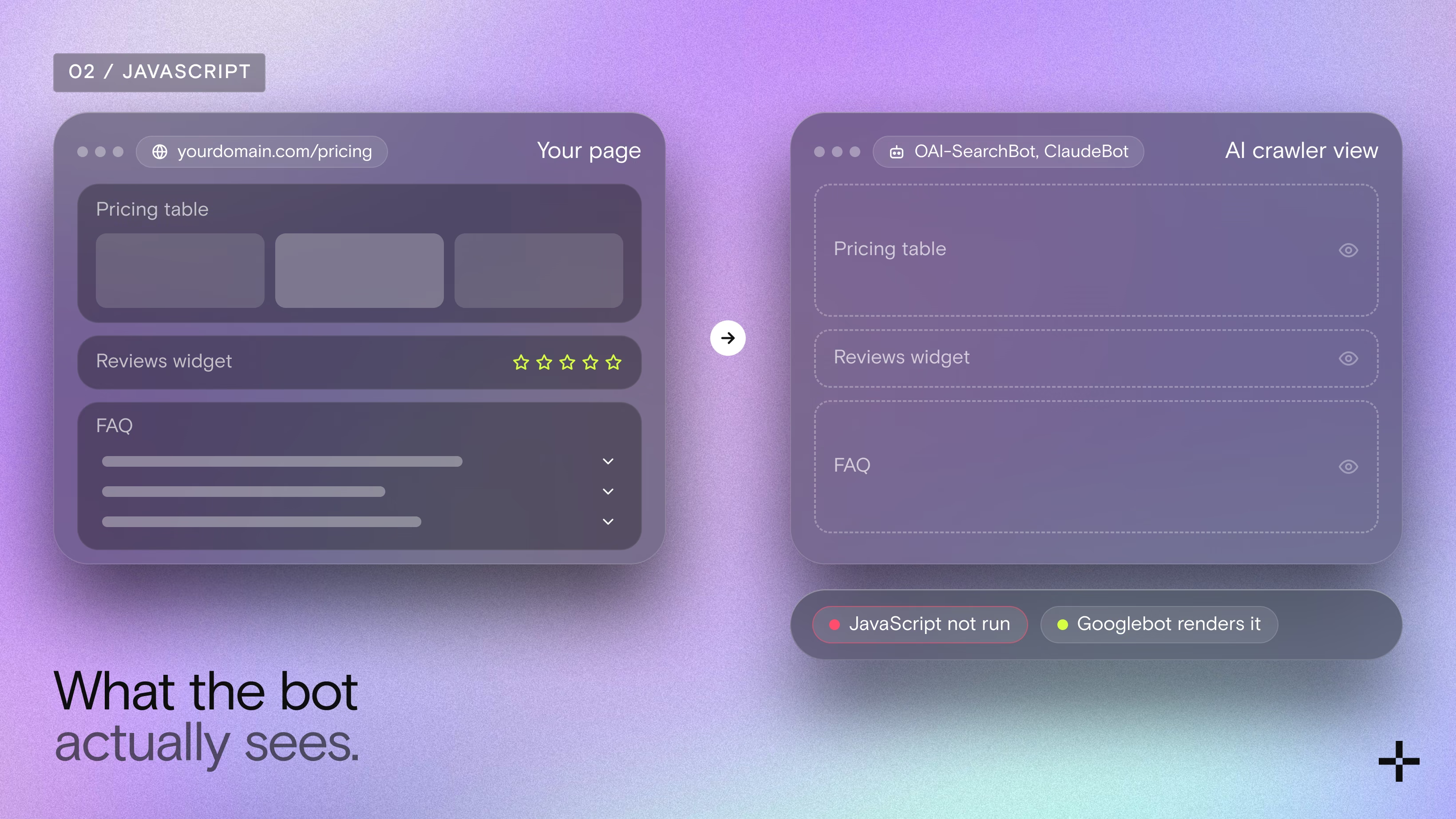
A study by Vercel and MERJ found that none of the major AI crawlers it tracked render JavaScript. That included OpenAI's bots, ClaudeBot, and PerplexityBot. They download the files but don't run them. Googlebot is the exception.
As a result, anything your page builds in the browser is invisible to them. On B2B sites, the usual suspects are review widgets, pricing tables pulled from a third-party tool, tabbed content loaded by a script, and FAQ blocks rendered by an app.
The test: open Chrome DevTools, disable JavaScript, and reload your pricing, comparison, and product pages. Whatever disappears, AI crawlers can't see.
Webflow publishes pages as HTML, so content built natively in the Designer or the CMS is in the source. Embeds are where to look. If the whole site renders in the browser, the fix is structural, and that's usually a Webflow migration conversation rather than a patch.
5. Bing has indexed your site
Microsoft Copilot and Bing's AI-generated summaries run on Bing. Many B2B teams have never verified their site in Bing Webmaster Tools, because Google sends most of their organic traffic.
Fix that now. Bing Webmaster Tools is also where Microsoft reports how often Copilot cites you (more on that in check 18).
The test: verify the site in Bing Webmaster Tools (you can import it from Search Console in a few minutes), submit your sitemap, and use URL inspection on your five most important pages.
Write pages an answer engine can quote
Now, the next question:
What do the bots find once they're in?
AI search works by retrieving pages and then pulling the specific passages that support an answer. Google describes its own version of this as grounding: its systems fetch relevant pages from the Search index, then review the specific information on them to build the response.
The job:
Make the useful passage easy to find and worth using.
6. The answer comes first under every heading
If someone asks "how long does a Webflow migration take" and your answer sits in paragraph four, after a story about your founding, you've made the passage hard to use.
The pattern I'd follow on every page: question as the heading, direct answer in the first sentence or two, then the explanation, then the example, then the exceptions.
This isn't "chunking." Google says outright that you don't need to break content into tiny pieces for AI. Writing that respects the reader is enough, and AI systems happen to like it too.
The test: on your ten most important pages, read only the first two sentences under each H2. Would they work as an answer if someone quoted them alone?
7. Your headings use the words buyers use
When someone asks Google's AI Mode a question, the model doesn't run one search. It runs a set of related searches, which Google calls query fan-out. For example: a question about fixing a weedy lawn also fans out to searches about herbicides, removing weeds without chemicals, and prevention.
B2B questions fan out the same way. "Best CRM for a 50-person sales team" turns into searches about pricing, integrations, onboarding time, and alternatives. A page that covers those follow-ups gets pulled for more of them.
Use real wording. Not guesses. This is one of two things we do differently on client sites now. Before we write a page, we use platforms that show what people in that industry search for, what they ask, and how they compare companies or products. Then we put those answers on the pages where they belong, so AI search has something to find.
Search Console queries, Semrush question reports, Bing's grounding queries (check 18), and your sales call notes are all better sources than a brainstorm.
One warning from Google's guide
Creating a separate page for every variation of a query, mainly to manipulate AI answers, falls under its scaled content abuse policy. Cover the follow-ups on the page they belong to.
The test: pull the top queries for your ten most important pages in Search Console and compare them with the H2s on those pages. Every high-volume question without a heading is a gap.
8. Your pages say something a competitor couldn't paste onto theirs
Google's guide is direct about this. Content that restates common knowledge adds little, and it points to first-hand experience and unique viewpoints as what stands out when AI systems compare sources.
What does "specific" mean for a B2B site?
Usually numbers and constraints. How long implementation takes. What a project costs and what moves the price. Which integrations exist and which don't. Who the product isn't for.
A page that promises "seamless integrations" and "world-class support" gives an AI system nothing to cite. Every competitor says the same thing.
The test: highlight every sentence on your homepage and main service page that a competitor could copy onto their own site without changing a word. If that's most of the page, start there.
9. Every article has a named author and an honest date
When AI search weighs sources against each other, an anonymous page from "the team" is easier to pass over than an article from a named person with a real role. Google's guidance on helpful, reliable, people-first content asks whether pages carry a byline, and whether that byline leads to background information about the author.
Dates matter too, because buyers ask about the current state of things: this year's pricing, the latest integrations, what changed. An article with no date undercuts the trust you're trying to build. So does the opposite trick: Google lists changing a page's date without substantially changing its content as a warning sign.
The test: open three articles at random. Is there a named author with a bio or author page? Does the updated date match a real change?
10. Your schema describes what's on the page, and nothing more
The other thing we do differently:
Schema.
There’s far more schema in the code of our client sites than there was two years ago. It explains the products, the business, and the company to AI systems in detail no human reader would bother with.
For most B2B sites, that means Organization schema on the homepage (with links to your official profiles, which ties into check 15), Article schema with the author on journal posts, BreadcrumbList across the site, and FAQPage only where a visible FAQ exists on the page.
Webflow says every site generates schema markup automatically, and you can add custom JSON-LD per page or bind it to CMS fields.
Either way, check what's already being output before you add more.
The test: run your homepage, one article, and one service page through Google's Rich Results Test or the Schema Markup Validator. Look for errors, and for schema that claims things the page doesn't show.
Publish the B2B pages buyers ask AI about
B2B buyers don't ask AI search for your mission statement. They ask how you compare, what you cost, what you connect to, and whether procurement will approve you.
If you don't publish those answers, AI search builds them from somebody else's page: a competitor's comparison, a two-year-old review, an outdated directory listing.
11. You have an honest comparison page for every alternative buyers weigh
"[Your product] vs [competitor]" and "[competitor] alternatives" are some of the most common B2B questions there are. If the only comparison page that exists is on your competitor's site, guess which one gets cited.
The important word here: honest. A comparison that admits where the other option is better is more useful to a buyer, and Google's guidance keeps coming back to usefulness as to what its systems look for. It also reads as a source instead of an ad.
The test: ask ChatGPT, Perplexity, and Google's AI Mode "[your product] vs [your main competitor]." Look at whose pages get cited.
12. Your pricing page answers "how much does it cost"
Plenty of B2B pricing pages say "Contact us" and stop. Then a buyer asks an AI assistant what you cost, and it answers from a third-party review site, a Reddit thread, or a competitor's comparison.
The good news: you don't have to publish a price list to fix this.
Starting prices, typical ranges, what moves the price up or down, and what's included all give AI search something accurate to work with.
The test: ask three AI assistants "how much does [your product] cost?" If the answers are wrong, find out where they came from.
13. Each real integration and use case has its own page
This is where query fan-out shows up for B2B. "Does [product] integrate with HubSpot?" "Does it work for healthcare companies?" These are specific questions, and the best answer is a specific page: what the integration syncs, how setup works, what its limits are.
The catch: they have to be real. One page per integration you support, or per industry you serve with something specific to say, is useful. A hundred templated pages with the industry name swapped in is the scaled content Google warns about.
On Webflow, CMS collections make this manageable, because each integration or industry page shares a template but carries its own fields.
The test: list your ten most-used integrations. Does each one have a crawlable page that says what it does and doesn't do?
14. Your security and compliance answers are public
Enterprise buyers ask AI tools the questions their procurement team will ask later. Is it SOC 2 compliant? Does it support SSO? Where is the data stored? Is there a DPA?
If those answers live only in a PDF that sales sends after a call, AI search can't find them. A public trust or security page with what you can say openly, like certifications, SSO support, data residency, and how to request documents, answers the question before procurement asks it.
The test: ask an AI assistant "is [your product] SOC 2 compliant?" Check whether the answer is right, and whether it cites your site or someone else's.
Not sure what AI search can see on your site?
Send us your URL. We'll run the access and structure checks and show you what's blocking citations.
Check my site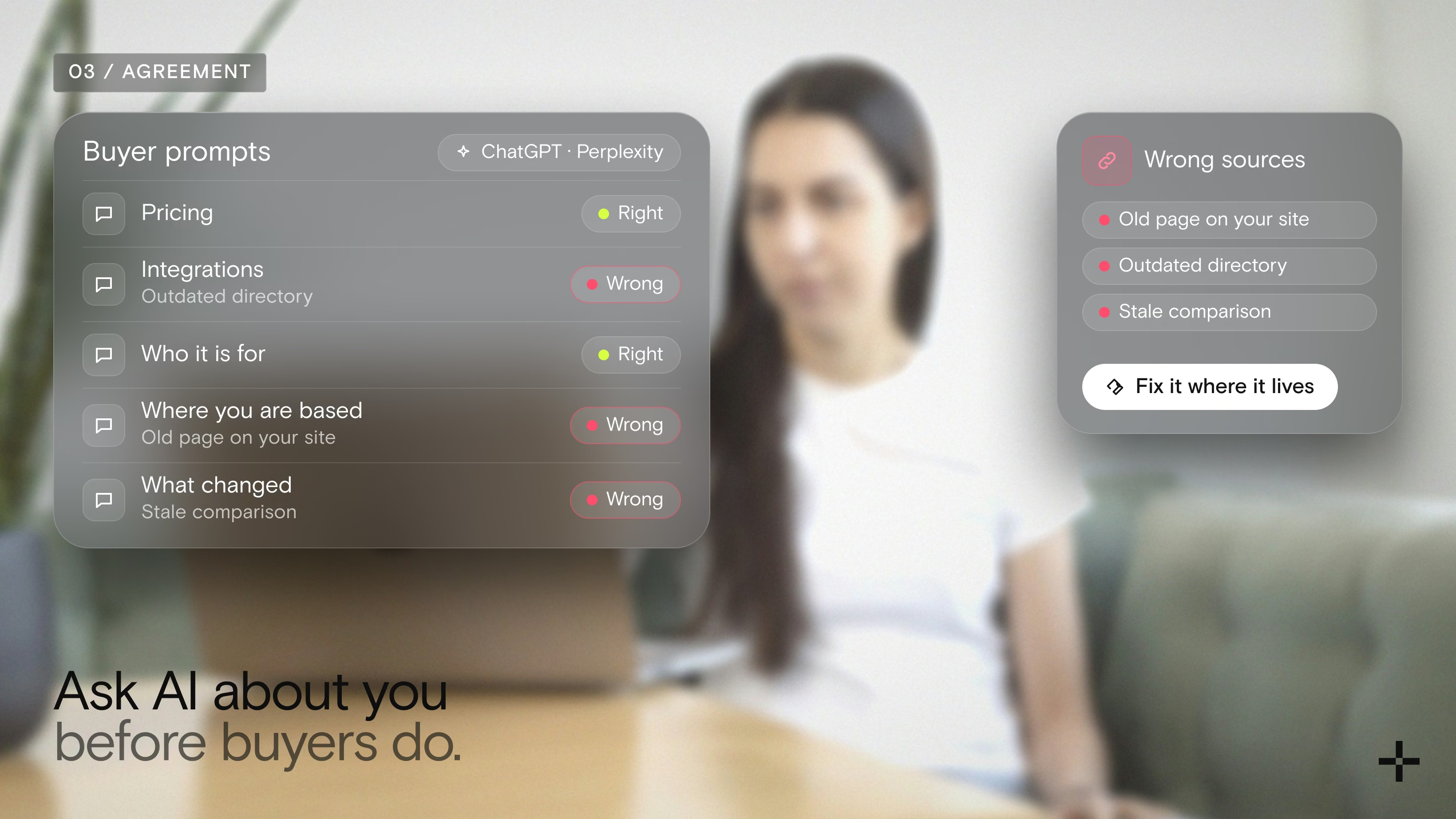
Make the rest of the web agree with your site
AI search doesn't take your word for it. It reads your site next to everything else written about you, and when those sources disagree, you lose control of the answer.
15. You describe the company the same way everywhere
Write one sentence that says who you serve, what you do, and where. Then check whether your homepage, About page, LinkedIn, review profiles, Crunchbase, and partner directories all say roughly the same thing.
They usually don't. The LinkedIn page still carries the positioning from two rebrands ago, a directory lists a product you retired, and the homepage says something new. Each of those is a conflicting fact an AI system has to resolve without you.
Your Organization schema can help here, because its sameAs property points to your official profiles and says, in machine-readable terms, that they're all you.
The test: ask three AI assistants "what is [your company]?" and compare the answers with your one sentence.
16. Other sites mention you because you earned it
Google says its AI features can show what's being said about products and services across the web, including blogs, videos, and forum discussions. It's also explicit that chasing inauthentic mentions isn't as helpful as it looks, because the same systems that rank content also filter spam.
For B2B, earned mentions usually come from customer reviews on the platforms your buyers use, partner and marketplace directories, podcasts and conference talks, case studies co-published with a customer, and original data other people want to reference.
The test: ask AI assistants "best [your category] for [your main use case]." Note which third-party pages they cite, then check whether you're on them.
17. You've checked what AI already gets wrong about you
Before you add anything new, find out what's broken. Ask AI assistants ten questions a buyer might ask about your company: pricing, integrations, who it's for, where you're based, what changed recently.
Log every wrong answer and trace it back. The source is usually an old page on your own site, an outdated directory listing, or a stale comparison on someone else's. Fix it where it lives, not by publishing a new page that contradicts it.
The test: a spreadsheet with ten prompts, the answer from each assistant, whether it's correct, and the cited source. That spreadsheet becomes the start of check 20.

Measure it, or you're guessing
A year ago, AI visibility was mostly guesswork. Now there are first-party reports for it. They're incomplete, sure. But they're real data, which beats a screenshot of one chatbot answer.
18. You're reading the AI reports Google and Bing give you
Search Console's Generative AI performance report, rolled out to all sites on August 31, 2026, shows how often links to your site appear in AI Overviews and AI Mode, broken down by page, country, and device.
Bing's AI Performance report, in public preview since February 2026, shows when your pages are cited in Microsoft Copilot, Bing's AI summaries, and some partner integrations. It also shows grounding queries: the phrases the AI used to retrieve your content. In June 2026, Microsoft added intent labels, topic groups, citation share, and period comparisons.
| Report | Covers | Doesn't cover |
|---|---|---|
| Search Console: Generative AI performance | AI Overviews, AI Mode | ChatGPT, Perplexity |
| Bing Webmaster Tools: AI Performance | Copilot, Bing AI summaries, grounding queries | ChatGPT, Perplexity |
Neither report covers ChatGPT or Perplexity. That's what checks 19 and 20 are for.
The test: open both reports and list your ten most-cited pages. Compare that list with the ten pages you want cited. The gap between them is your content plan.
19. AI referral traffic has its own line in GA4
In May 2026, Google added an AI Assistant channel to GA4's default channel group, so sessions from recognized assistants like ChatGPT and Gemini no longer hide inside Referral. ChatGPT also adds utm_source=chatgpt.com to the links it shows, which helps.
Two caveats. Clicks from Google's own AI Overviews and AI Mode count as organic search, not AI Assistant traffic. And visits from apps that don't pass a referrer land in Direct. So treat the number as a minimum. That row is also how we measured Timefold's rebuild: traffic from AI assistants rose 130% in the first month after launch.
The test: in GA4, go to Reports, then Acquisition, then Traffic acquisition, and find the AI Assistant row. Then check which landing pages that traffic hits, and whether it converts.
20. You track the same buyer prompts every month
Pick 20 to 30 questions your buyers ask. The best source is your sales team, because they hear the exact wording. Run them every month in ChatGPT, Perplexity, Google's AI Mode, Copilot, and Claude.
For each answer, record whether you're mentioned, whether you're cited, which page was cited, and which competitors showed up. AI answers vary from one run to the next, so the trend over months matters more than any single answer.
Tools can automate this. If you're on Webflow Enterprise, Webflow AEO measures how your brand appears in AI answers inside the platform. A spreadsheet works fine to start.
The test: your first run is your baseline. Without it, you can't tell whether anything on this list made a difference.
What's not on this list, and why
Some of the most-shared GEO advice didn't make the cut. The reason is that the companies running the AI systems say it doesn't do what people claim.
llms.txt. Google says Search doesn't use llms.txt files and won't treat your site differently for having one. Webflow's own help page calls the format experimental, with unproven impact. On Webflow you can upload one in Site settings, under SEO, in about ten minutes, so there's no harm in it. Don't expect it to move anything.
Chunking content into tiny pieces. Google says its systems understand pages with several topics and don't need content broken up for AI. Write for the reader (check 6) and you're covered.
Rewriting pages "for AI." Google says AI systems understand synonyms and meaning, so you don't need to chase every long-tail variation.
Buying mentions. Paid listicles and fake forum posts fall under what Google calls inauthentic mentions, and its spam systems apply to AI features too.
Schema for its own sake. It helps when it describes the page. It doesn't help as decoration.
The short version: GEO is SEO without the shortcuts
Step back from all 20 checks and the pattern is simple:
AI search rewards the same things good SEO always did: pages machines can reach, answers people can use, claims the rest of the web confirms, and someone checking the numbers.
What changed is how fast a gap shows up. A blocked crawler or a vague pricing page used to cost you a ranking position. Now it can cost you the whole answer, because the buyer reads a summary built from someone else's page.
If you're planning a rebuild anyway, it's cheaper to build these checks in than to retrofit them later. That's the starting point for every Webflow development project we take on.
For what the platform itself does and doesn't handle, I went through it in Is Webflow good for SEO and AEO?
Want AI search to find the site you're building?
Tell us what you're launching. We'll build it in Webflow with these checks done before go-live.
Start a project


