More than one founder has come to us with the same request:
They don't like how their website looks anymore, and they want it to feel fresher so customers take the company more seriously.
Fair enough. But once we dig in, the look is rarely the real problem. More often than not, the site doesn't explain what the company does, and the people it's built for don't get it.
That's why I don't start a redesign with design. I start with the business, and there's a list of things I won't open a design file without.
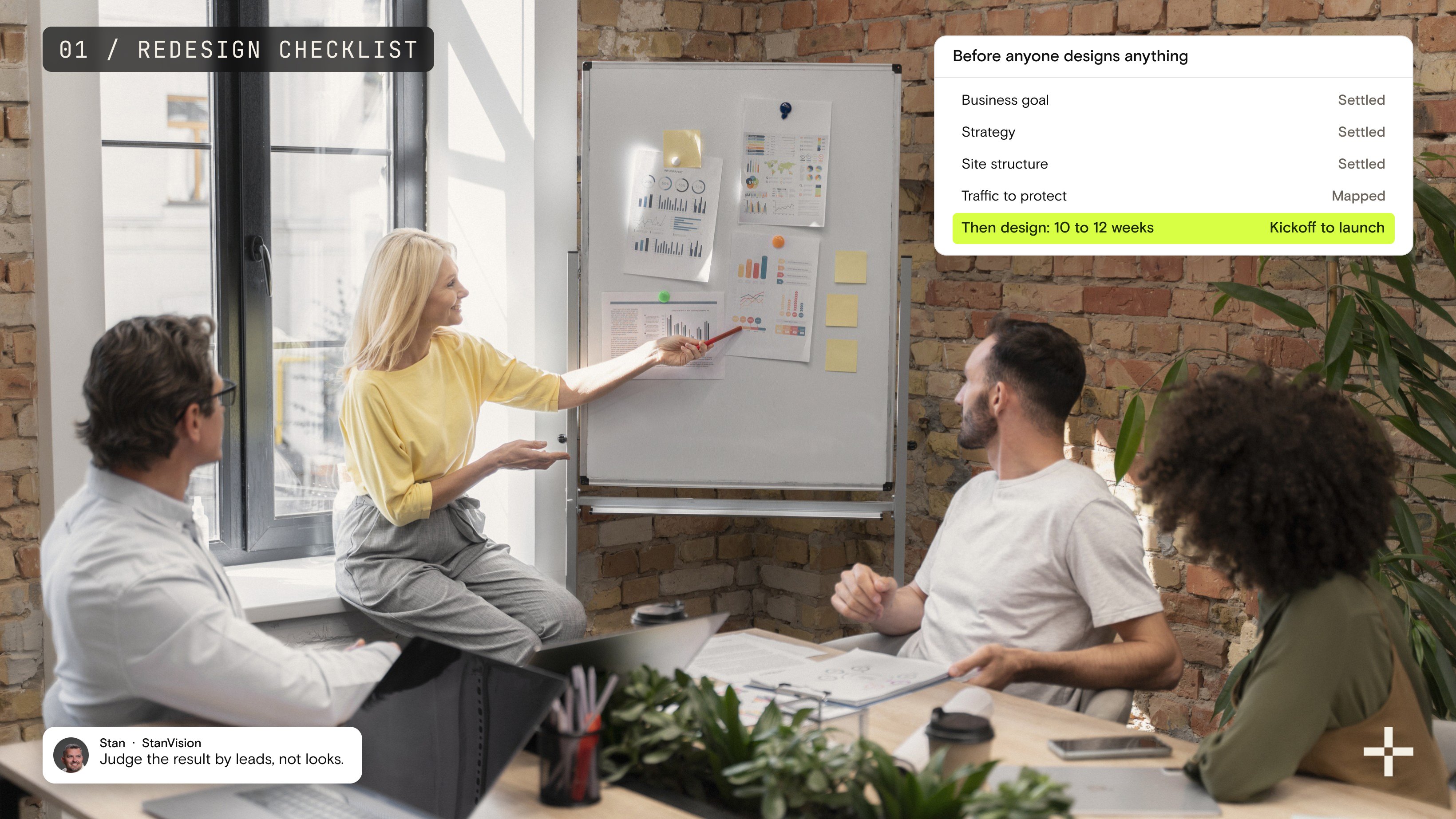
In short, the crucial rules are: settle the business goal, the strategy, the site structure, and the traffic you need to protect before anyone designs anything. Plan for 10 to 12 weeks. Then judge the result by leads, not looks.
Here's the full website redesign checklist in the order I actually work through it:
What should you audit before agreeing to a redesign?
Simple.
The business.
Every time someone asks us for a redesign, we start with the business itself, before anyone talks about layouts, colors, or animations.
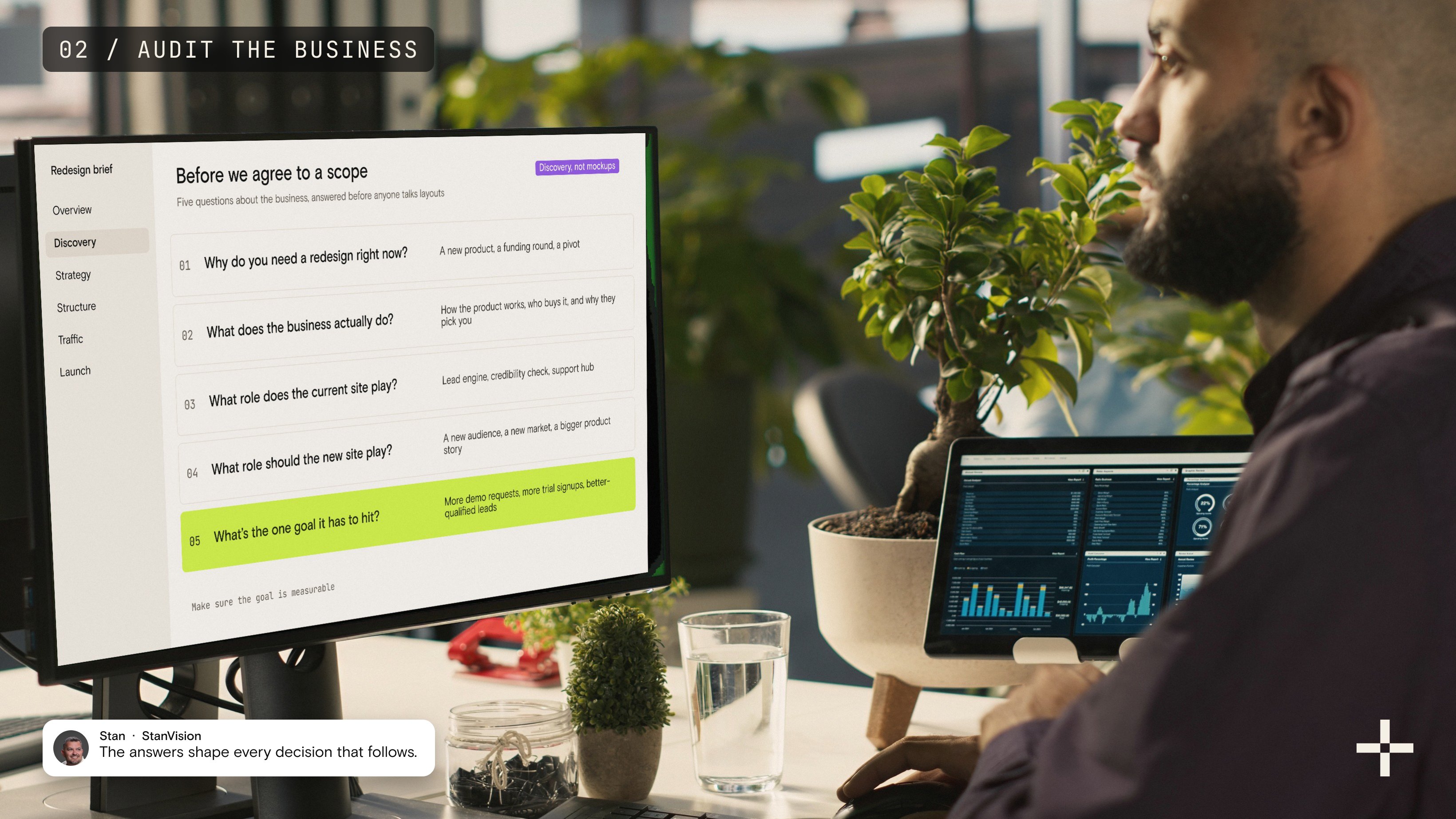
A website is a tool, so the first job is understanding the company it serves. These are the questions I need answered before I'll agree to a scope:
- Why do you need a redesign right now? Something triggered this. A new product, a funding round, a pivot, a sales team that's stopped sending people to the site. That trigger tells me what the project is really for.
- What does the business actually do? The details. How the product works, who buys it, and why they pick you over the alternatives.
- What role does the current site play? Is it a lead engine, a credibility check before a sales call, a support hub? Often it's quietly doing a job nobody wrote down.
- What role should the new site play? The new site might need to carry a new audience, a new market, or a much bigger product story.
- What's the one goal it has to hit? More demo requests, more trial signups, better-qualified leads. Make sure it's measurable.
People sometimes ask whether I've ever talked a client down from a full redesign to a lighter refresh. The honest answer is no, not once. By the time a company asks for a redesign, the problems usually run deeper than the visual layer. Swapping fonts and colors on a site with a broken structure just gives you a nicer-looking broken site.
That's also why a website redesign with us always begins with discovery, not mockups. The answers to these five questions shape every decision that follows.
Does your site look bad, or is it just confusing?
This is the most common wrong diagnosis I see. A client wants their site to look better because they believe customers will take them more seriously.
Then we start digging, and a different picture shows up. The site doesn't explain the product. It doesn't explain what the business does. And the target audience, the exact people the site exists for, doesn't understand it.
So the job isn't really to make the site look better. It's to make it explain the service or product better, to the people who matter.
That changes the whole brief. A "make it prettier" project is about visuals. A "make it easy to understand" project is about messaging, structure, and hierarchy first, with the visuals built to carry them.
Before you decide what's wrong with your site, run a quick check:
- Show your homepage to a few people who match your buyer profile and ask them to explain what you do in one sentence. If the answers are vague or wrong, looks aren't your problem.
- Look at the questions prospects ask on sales calls. If they keep asking things the site should have answered, the content is failing, not the design.
- Read your homepage headline out of context. If it could belong to any company in your category, it isn't doing its job.
None of this means design doesn't matter. It matters a lot. It just can't fix a message nobody worked out in the first place.
What has to be decided before the redesign begins?
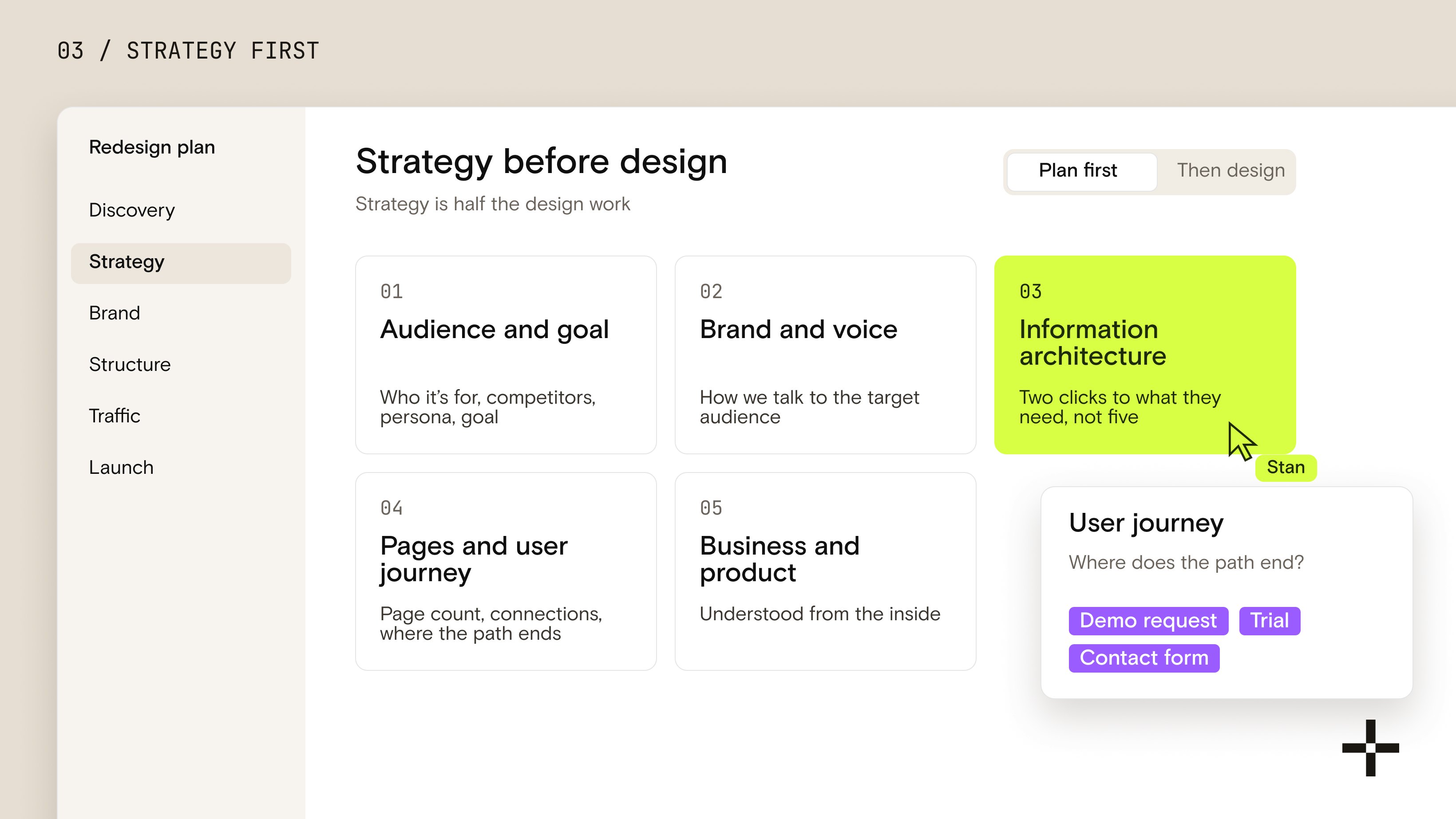
Most of it. The most important part of a redesign happens before the design itself. We call it strategy, and in my experience, strategy is half the design work.
Here's what I won't start designing without, in the order we work through it.
1. Who the site is for and what it has to achieve
Strategy starts with four questions:
- Who are we building this site for?
- What are the competitors doing?
- What is the target persona?
- What is the goal of the site?
The competitor review isn't about copying anyone. It's about knowing what your buyer has already seen in the other tabs they have open, so your site can say something they haven't heard yet.
2. Brand, including how you communicate
That step is the easiest to underestimate. Brand isn't just the visual side. It's also the way you communicate.
How do we talk to the target audience? What tone earns their trust? What words do they use for their own problem?
If that isn't settled, every page ends up sounding slightly different, and the site reads like it was written by five people who never met. Settling it is branding work, and it belongs in the plan, not after it.
3. Information architecture
Then comes the structure of the site itself. What information are we presenting, and how is it organized? This is the information architecture, and it decides whether a visitor finds what they need in two clicks or gives up after five.
4. Pages, connections, and the user journey
Once the architecture is settled, we define how many pages the site needs, how they connect, and what the user journey looks like.
Where does a first-time visitor land? What do they need to see before they trust you? Where does that path end: a demo request, a trial, a contact form?
5. The business and the product, from the inside
It's an absolute must to understand the foundation of the client's business and product. A website has to explain something, and it has to explain it really well. We can't do that if we don't understand it ourselves.
Only when all of this is settled do we start designing. It can feel slow to a client who's eager to see screens. However, it's the part that keeps the design phase from turning into endless revision rounds, because every decision already has an answer to point back to.

How do you redesign a website without losing SEO?
I protect traffic in planning, not after launch. I never start redesigning pages without knowing which ones were bringing people in.
So before the new site takes shape, we audit the traffic on the current one. Which pages get visits? Which keywords do those pages rank for? And when we redesign those key pages, we keep what's working so traffic doesn't drop. The goal is actually to grow it, because better structure and better semantics give search engines more to work with. That's the work our Webflow SEO team builds into every project.
In 2026, that audit has to cover more than classic SEO. You need to know where your traffic comes from and through which channel:
- Search traffic from Google. Search Console shows which pages and queries earn clicks. Google also counts visits from its AI features, AI Overviews and AI Mode, inside the same Performance report, under the "Web" search type (Google Search Central).
- AI assistant traffic. Visits from tools like ChatGPT or Perplexity show up as referral traffic in GA4. If certain pages are getting cited and clicked there, they need the same protection as your top-ranking pages.
- Everything else. Direct, email, paid, and social traffic all land on specific URLs too. Campaign links break just as easily as search results do.
Then comes the part most people think of as "the migration": moving that traffic to the new site in a way that tells Google and AI systems these pages still exist. They've just changed and improved.
Google's own site move documentation lays out what that takes:
- Map every old URL to its new one. Start with the pages that get the most traffic and links, then work through the rest.
- Use permanent server-side redirects (301 or 308) from each old URL to its new version.
- Redirect straight to the final destination. Google advises against redirect chains and recommends keeping any unavoidable chain short, ideally no more than three hops.
- Don't dump old pages onto the homepage. Redirecting many unrelated URLs to one page can be treated as a soft 404.
- Keep redirects live for at least a year, so Google has time to transfer every signal to the new URLs.
- Update internal links, canonical tags, and the sitemap so nothing on the new site still points at old addresses.
Google also recommends changing one thing at a time where possible: domain, CMS, then layout. In reality, a redesign often bundles a new design with a new platform. That's exactly why the URL plan has to be airtight before launch day.
It works when it's done properly. When we moved Gridwise from WordPress to Webflow, their rankings held through the move and conversions went up 24%. If you're planning a platform change as part of your redesign, our Webflow migration process is built around exactly this audit. And if you're wondering how Webflow itself holds up for search after the move, I've written about that in Is Webflow good for SEO and AEO?
Plan it before you design it
We'll audit your current site and traffic before a single screen gets designed.
Start with an auditHow long does it take to redesign a website?
A realistic timeline for a serious redesign is 10 to 12 weeks. Call it three months.
The important detail is where that clock starts. It's not at the first planning call, and not when the contract is signed. It starts at the kickoff with the client team and runs until the finished site is live.
If the redesign includes a migration and the existing site is large, that number can stretch to 16 weeks. More pages means more URLs to map, more content to move, and more redirects to test, and none of that is work you want to rush.
A few things you can do before kickoff to protect that timeline:
- Name one decision-maker. Every extra approver adds days to every feedback round.
- Gather access early. Analytics, Search Console, the current CMS, the domain registrar. Waiting on logins is the most avoidable delay there is.
- Know where your content lives. Whether it's getting migrated, rewritten, or retired, someone has to own it.
If you're setting the budget alongside the timeline, I've broken down what the platform side costs in Webflow pricing in 2026.
How do you know the redesign actually worked?
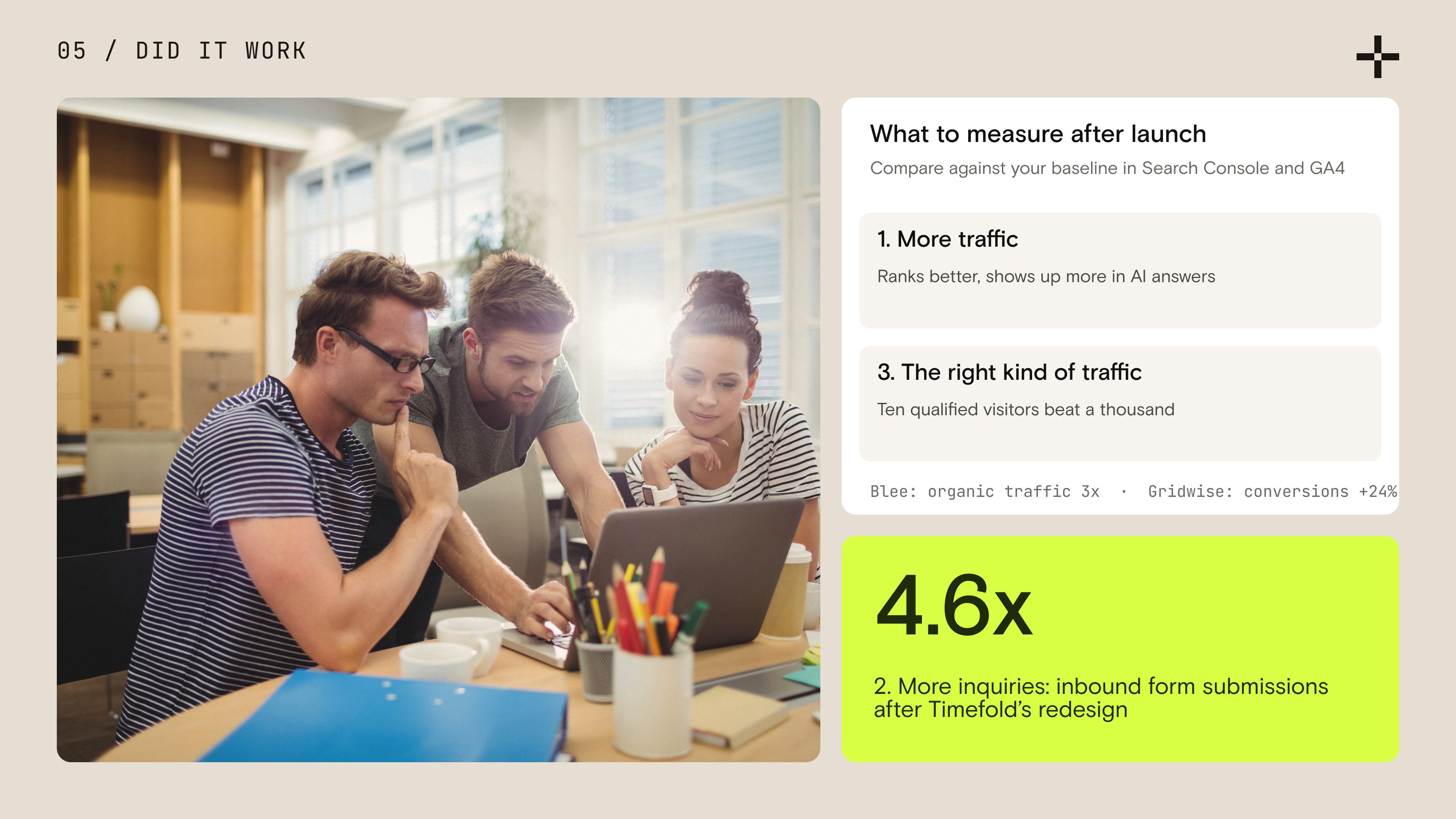
By what improves after launch. For me, two numbers matter most, with a third that decides whether the first two mean anything:
- More traffic. More people can reach the site, which means it ranks better in search and shows up more often in AI answers.
- More inquiries. If the main call to action is "Book a demo," demo requests should go up. If it's a free trial, more people should be starting trial sessions in the product.
- The right kind of traffic. A redesign can increase traffic, but if those aren't the right people, it doesn't matter. Ten qualified visitors beat a thousand who were never going to buy.
If I had to pick one, it's the second: more inquiries and more started trials. That's the number that shows up in the pipeline.
Here's what that looks like on real projects:
After we redesigned Timefold's site and moved more than 200 pages off Craft CMS, inbound form submissions went up 4.6x, and their visit-to-lead rate rose 7x. Blee saw organic search traffic triple after launch.
One practical note: you can only prove improvement if you know where you started. Record your baseline before launch: traffic by channel, top landing pages, conversion rate, and demo or trial numbers. Then compare the same numbers in Search Console and GA4 over the weeks after launch. Google itself notes that rankings can fluctuate for a few weeks while it processes a move, so judge the trend, not the first few days.
The website redesign checklist, in order
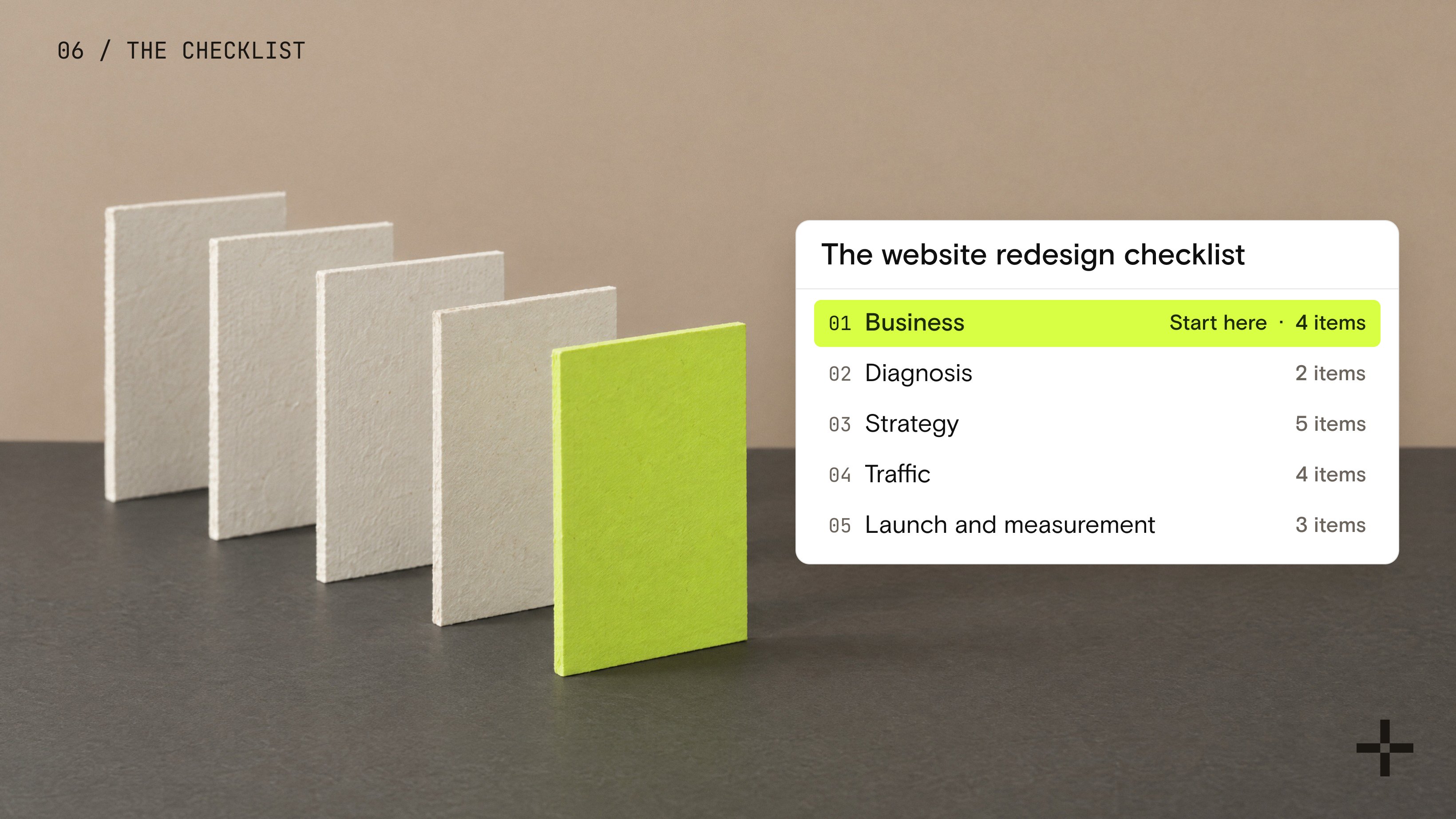
Here's everything above as one list you can work through with your team:
Business
- Name the trigger: why the redesign is happening now
- Define what the business does, in plain words, beyond the tagline
- Write down the role the current site plays and the role the new one must play
- Pick one primary goal and the metric that proves it
Diagnosis
- Test whether buyers understand what you do before judging how the site looks
- Review sales-call questions the site should already answer
Strategy
- Define the audience and target persona
- Review what competitors say and show
- Settle the brand voice: how you talk to your audience, not just how you look
- Build the information architecture
- Set the page count, page connections, and user journey
Traffic
- Audit traffic by page, keyword, and channel, including AI referrals
- Map every old URL to its new URL
- Plan single-hop 301 redirects and keep them live for at least a year
- Update internal links, canonicals, and the sitemap
Launch and measurement
- Record baseline traffic, conversions, and demo or trial numbers
- Plan 10 to 12 weeks from kickoff, up to 16 with a large migration
- Monitor Search Console and GA4 after launch and judge the trend
Plan the business before the design
A redesign that starts in a design tool is a guess. One that starts with the business, the message, the structure, and the traffic data is a plan.
That's the whole idea behind this checklist. The visual work matters, and it's often the part everyone remembers. But it only works when it sits on top of decisions that were already made: who the site is for, what it has to say, and which pages you can't afford to lose.
If you take one thing from this article, make it this:
Don't ask for a site that looks better. Ask for a site your buyers understand faster. The first is a design project. The second is the one that moves demo requests, trials, and revenue.
That's the redesign I plan for every client, and it's why the design file is never the first thing we open.
Ready to plan your redesign?
Tell us what your site needs to do. We'll map the plan before anyone designs a thing.
Plan my redesign