
Key takeaways
- CMS regret starts before the platform gets chosen. Most failures trace back to signing a contract before mapping what the team actually publishes.
- Licensing is the smallest cost in an enterprise CMS budget. Implementation runs $50K to $300K and migration adds $10K to $50K.
- Hybrid platforms are becoming the default enterprise choice. They combine the visual editing marketers already know with API delivery for whatever channel comes next.
- A CMS with only two permission tiers fails most audits. Role-based access, audit logging, and single sign-on outweigh any feature on a spec sheet.
- A well-mapped migration protects rankings, not just content. One of Stanvision's 200-page migrations gained 15% more Google clicks and 130% more AI-referred traffic.
I'll say this upfront: most CMS regret has nothing to do with the platform. It's what happens when a team signs a contract before figuring out what they actually need.
I've watched many times marketing teams get stuck filing developer tickets for a single sentence change, and finance ask why a "cost-saving" migration ended up costing more in year two.
But this is what happens when a platform gets picked for what it can theoretically do and not for how your team actually publishes day to day.
So this post isn't a rundown of the "best" enterprise CMS platforms, but it's what I'd actually walk a client through before they sign anything.
What should enterprise teams look for in a CMS?
Enterprise teams should look for a CMS that fits what their site actually is, not what looks impressive in a vendor demo.
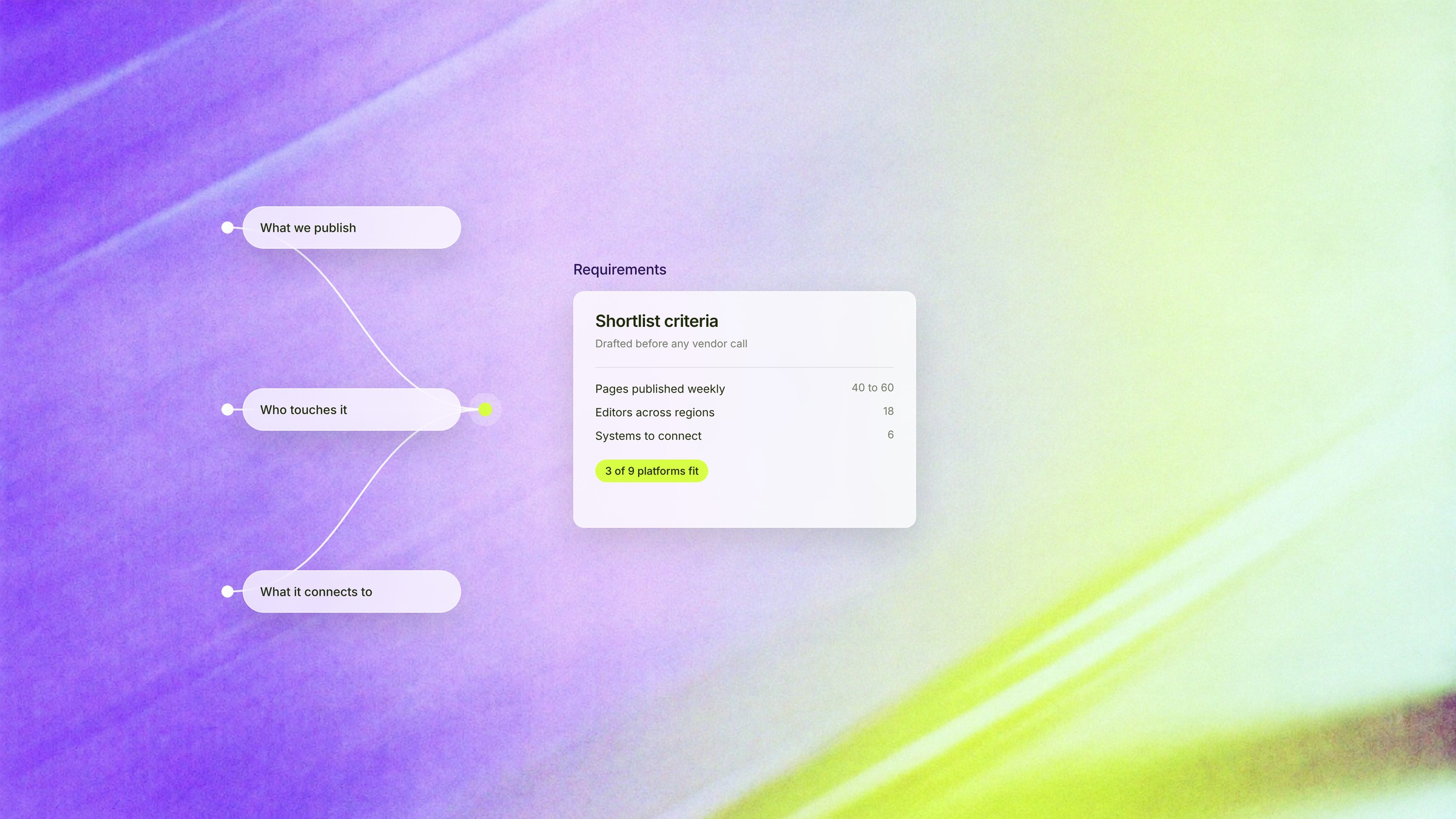
That means auditing what you publish, who touches it, and what systems it has to connect to, before comparing a single feature list.
We once turned down a Webflow migration for a major US food delivery platform, because most of what they run isn't a marketing site at all. It's an application: restaurant listings, live ordering, real time tracking.
We told that client the truth, even though it meant walking away from the project. Webflow wasn't the right tool for that job, and pretending otherwise would have been an expensive way for everyone to end up disappointed.
And that's the audit that most selection processes skip, because well… vendors are excellent at demos (that's their job, after all!).
But the real question was never what a platform can theoretically pull off. It's whether it's genuinely good at the handful of things your team does every single week.
What should you audit before taking a vendor call?
Here's what genuinely deserves an afternoon of your time:
- What you publish, and how often. Blog posts and landing pages are a completely different job than product catalogs or dozens of campaign microsites.
- Who actually touches the content. Just marketing, or marketing plus regional teams plus agencies plus developers?
- What systems it needs to talk to. CRM, marketing automation, analytics, whatever your real stack looks like today (not the one you're hoping to have someday).
There's also something enterprise teams live with that smaller companies simply don't experience.
An enterprise website never really finishes, it behaves less like a completed project and more like a living, growing thing: always sprouting new pages, new campaign sections, new microsites for whatever launched last quarter.
A five-person startup can get by with a handful of templates, no problem. But an enterprise team is building new structure practically every month, and the CMS has to keep pace with that, not just handle launch day and call it done.
That's the requirements side sorted.
Once you know what you're actually building for, the next decision is architecture, and this is where most of the real trade-offs live.
Headless vs traditional CMS: what do enterprises actually trade off?
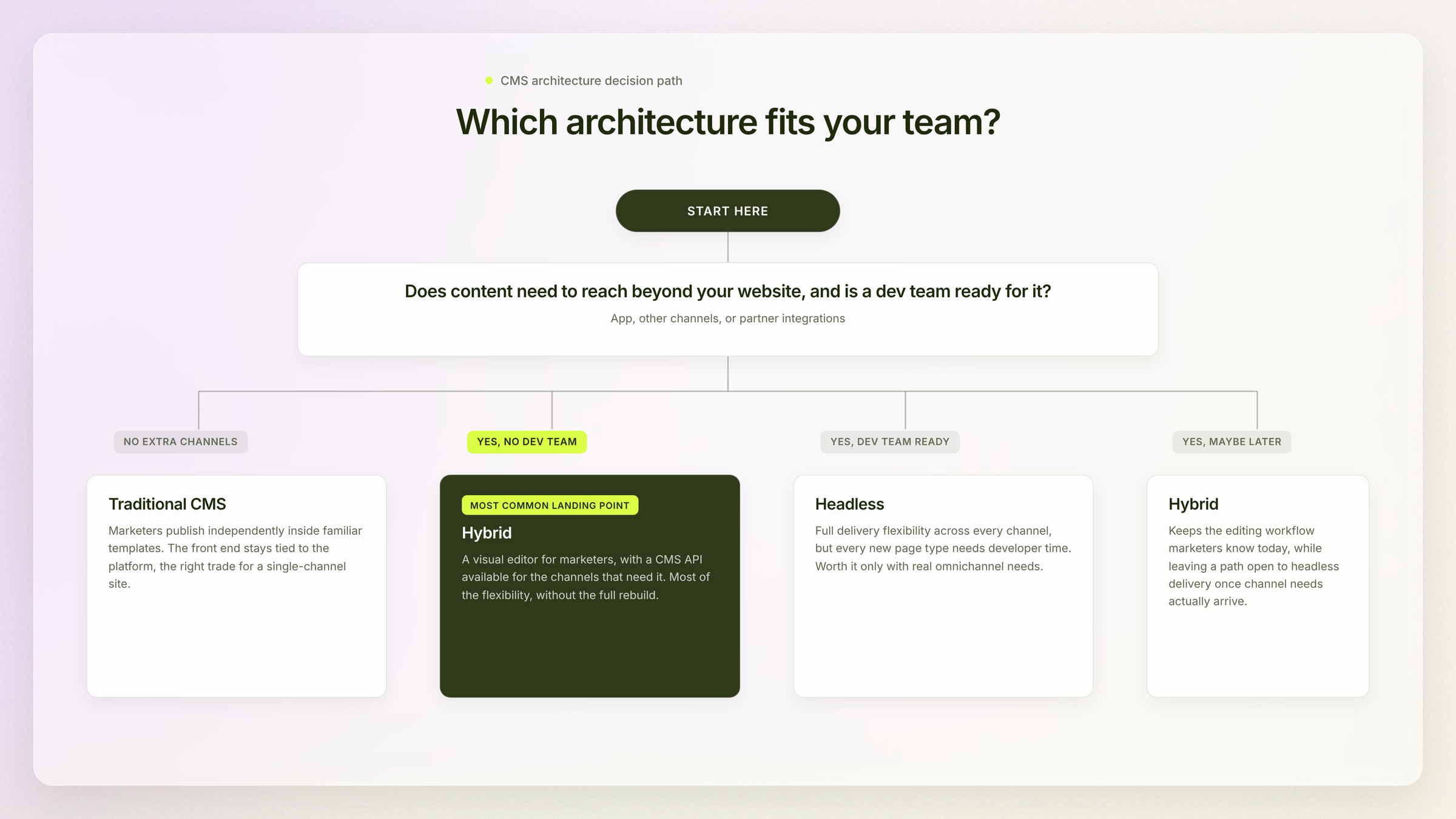
Headless CMS trades editorial simplicity for delivery flexibility: content ships to any channel through APIs, but every new page type usually needs developer time to build.
Traditional CMS trades that flexibility for speed: marketers publish independently inside familiar templates, but the front end stays tied to the platform.
And most enterprises, in practice, land somewhere in the middle.
Even a platform built primarily around visual editing, like Webflow, can serve content through its own CMS API when a team needs to feed it into another system or channel, without giving up the editing workflow marketers already know.
Which means you get most of the flexibility of going fully headless without the full rebuild.
Quick breakdown of where each model tends to win:
Common mistake:
One thing worth clearing up before you assume headless automatically means faster: it doesn't. Sure, it can be.
But that's not the whole picture, and speed comes from the rendering strategy.
A headless site can run 40-60% faster than a traditional build, but only when it's paired with server-side rendering or static generation, plus a CDN. But if you skip that part, and a poorly rendered headless site can end up slower than a well-built traditional one.
Personal insight:
Something I've been watching shift in real time deserves a mention here.
Headless has traditionally suited developer-heavy teams that want total control over every build decision, and that's still true today. But AI coding tools have gotten good enough, fast enough… so that the gap is narrowing.
A hybrid platform doesn't need a small team of engineers to extend it the way it did even two years back.
And I don't think that fully replaces headless for teams with genuine omnichannel needs. But what it does, though, is change who actually needs it versus who's choosing it out of habit.
Here's the short version of the question "which CMS do I need", if you want to skip straight to your answer:
What role does content modeling play in enterprise CMS?
Content modeling is the blueprint that defines how your content is structured, related, and reused across every channel, and it happens before a single page gets built.
Which means that if you skip this step, the same product description ends up duplicated in five places, drifting out of sync the moment someone updates just one of them.
But if you get it right, then one edit updates everywhere it needs to.
Why does API-first architecture matter for enterprise CMS integrations?
API-first architecture matters because it lets your CMS plug into CRM, marketing automation, and analytics tools without custom, one-off code for every single connection.
In practice, that tends to look like:
- Pricing or product data flowing straight from the CMS into the CRM, no manual re-entry
- Campaign content reused across the website, email, and app instead of rebuilt three separate times
- New integrations added without triggering a full re-platform every time marketing picks up a new tool
For context:
There's a question showing up in our scoping calls these days that simply didn't exist a year ago, whether an AI assistant like Claude can connect through the Model Context Protocol (the open standard for linking AI tools to outside systems) and edit content directly, with no human ever opening the CMS interface.
It only works if the content underneath is genuinely well-modeled and API-first. And honestly, in my experience it isn't reliable enough yet for content or design decisions.
So it's worth watching, but not yet worth building a requirement around.
Now the next question almost every enterprise team asks is the one that actually decides the budget conversation: what is this going to cost, really?
What does an enterprise CMS actually cost?
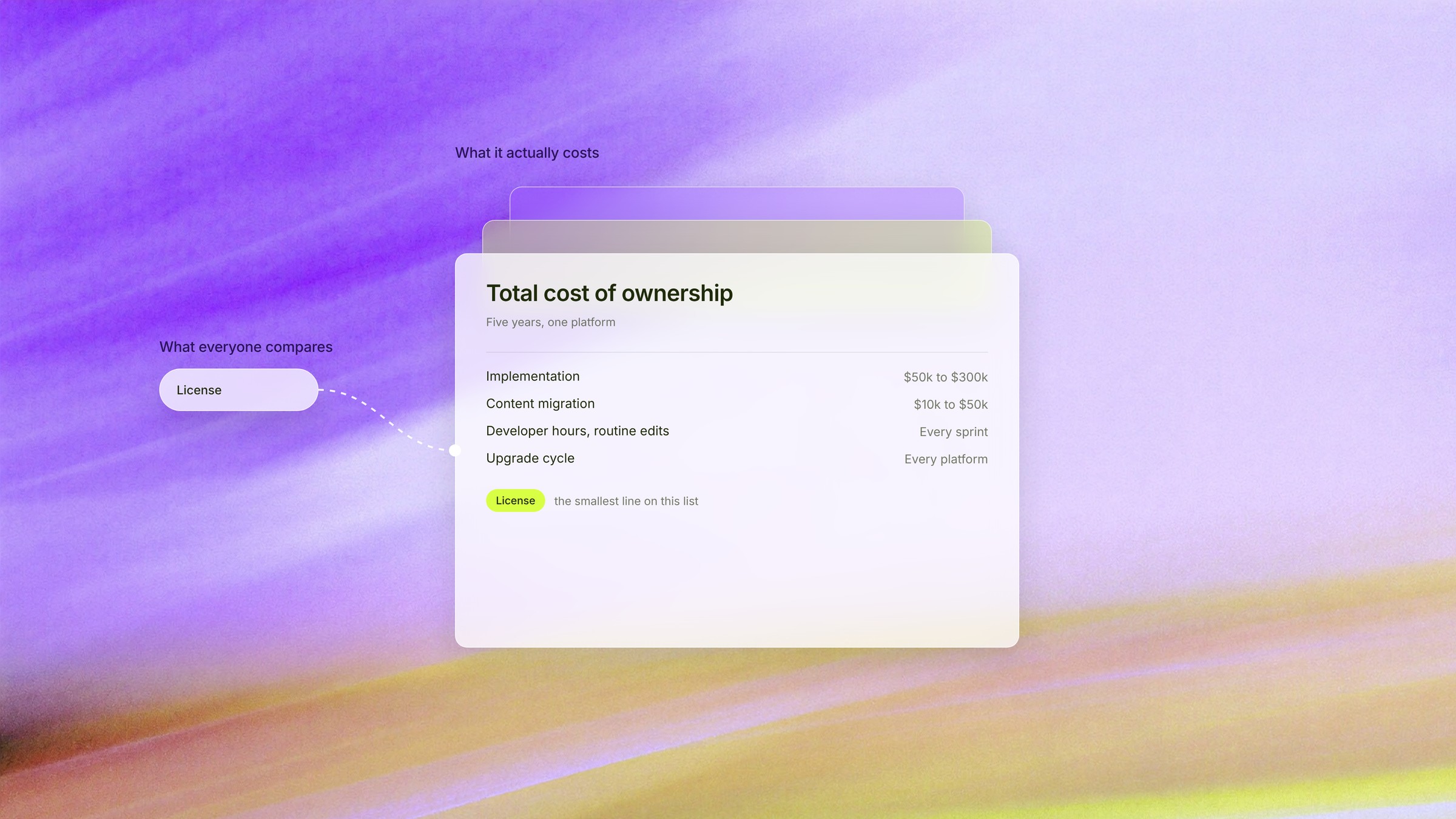
Licensing is usually the smallest line item in enterprise CMS total cost of ownership, even though it's the number everyone fixates on first.
While the real cost drivers are implementation, the ongoing developer hours needed for routine changes, front-end hosting if you go headless, and the upgrade cycle every platform eventually forces on you.
Migration adds yet another layer that most teams don't budget for until they're already knee-deep in it.
Numbers to know:
- Implementation for enterprise-scale builds typically runs $50,000 to $300,000 or more
- Migrating content from a legacy platform tends to add another $10,000 to $50,000+, depending on volume and how messy the old content is
- Industry-wide, enterprise migrations typically take six to eighteen months start to finish
How much of that range you land in usually comes down to execution, not only the platform, which is exactly why picking a good webflow agency matters as much as picking the right CMS architecture.
What does an enterprise CMS migration look like?
Most enterprise clients don't actually ask for a migration on its own. They want a full redesign and a migration at the same time, done carefully enough that they don't lose the traffic they already have, ideally gain some.
I can say that combination is the norm in our experience, not the exception.
I will give an example with the project we're running right now, a site north of 1,400 pages, going through a full redesign and migration together.
In short, here's what the migration involves:
- Map every page against what it currently ranks for, before anything moves
- Export the content from the old system, in full
- Import it into the new build, then rework whatever is needed to match standards for a good CMS like Webflow
- Launch, with redirects and structure already tested
- Monitor Google Analytics 4 and Search Console afterward, specifically to confirm traffic and rankings held, or grew
Clients want to come out the other side with the same content, more day-to-day control over it, and better SEO and AEO than they started with, not just a like-for-like copy with a new coat of paint.
In terms of timeline: our Wordpress to Webflow migrations usually land around four months, well under that industry range, mostly because of the work we put into mapping everything up front, not because the build itself moves faster.
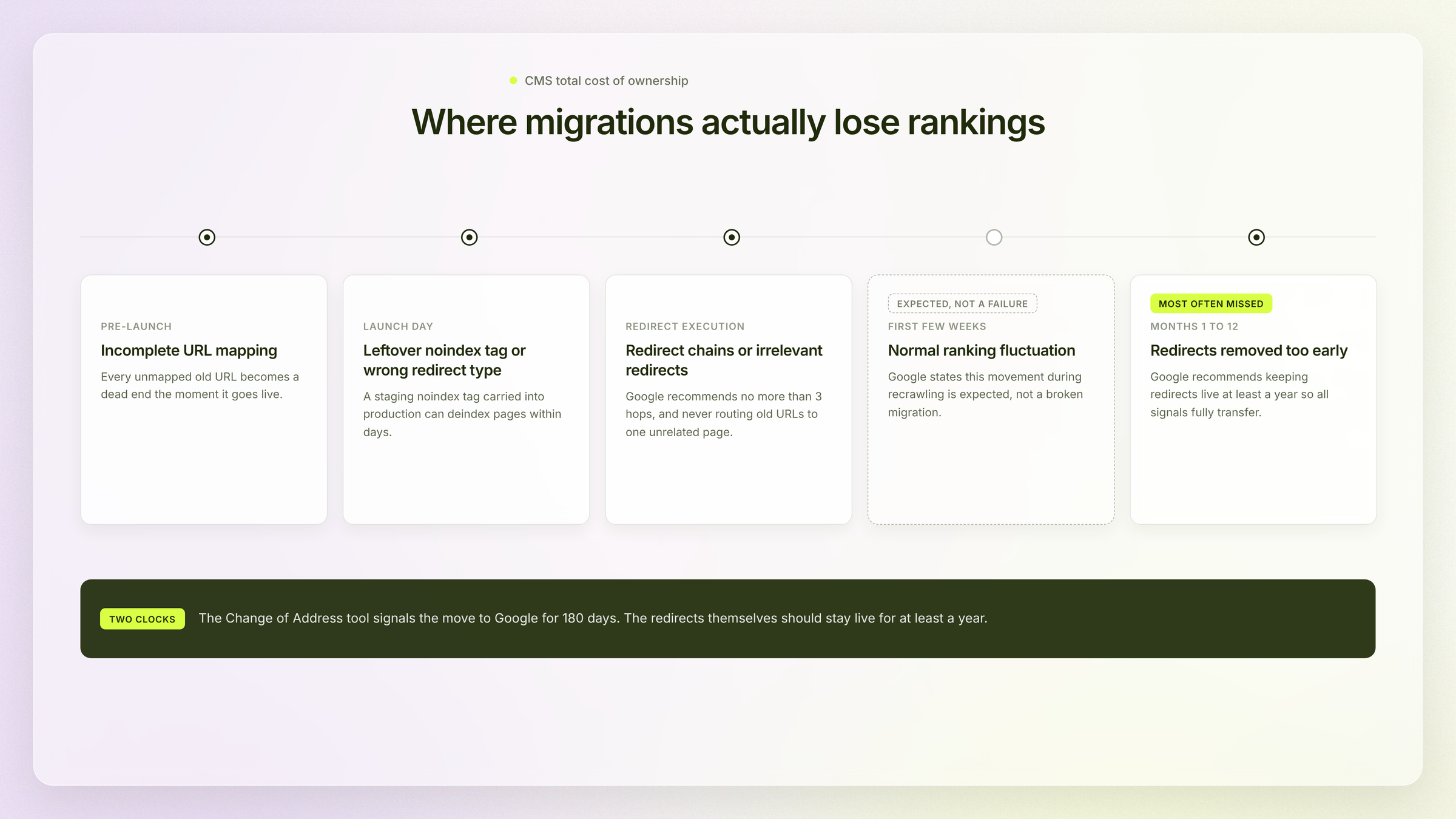
Worth noting: The teams who lose search visibility mid-migration are almost always the ones who treated content mapping as a formality instead of the actual work.
And here's where teams actually lose that visibility:
Timefold's own migration off Craft CMS is a good example of what paying attention to that step actually buys you.
Over 200 pages moved, and the site came out the other side with 15% more clicks from Google Search and 130% more traffic from AI assistants (a real proof that Webflow is very good for SEO when the migration gets the attention it deserves.)
And no, that's not just luck. This is the result when SEO gets treated as a requirement from the start, not a cleanup job tacked on after launch.
With cost on the table, the next conversation usually comes from a different department entirely: security.
What role do security and governance play in choosing a CMS?
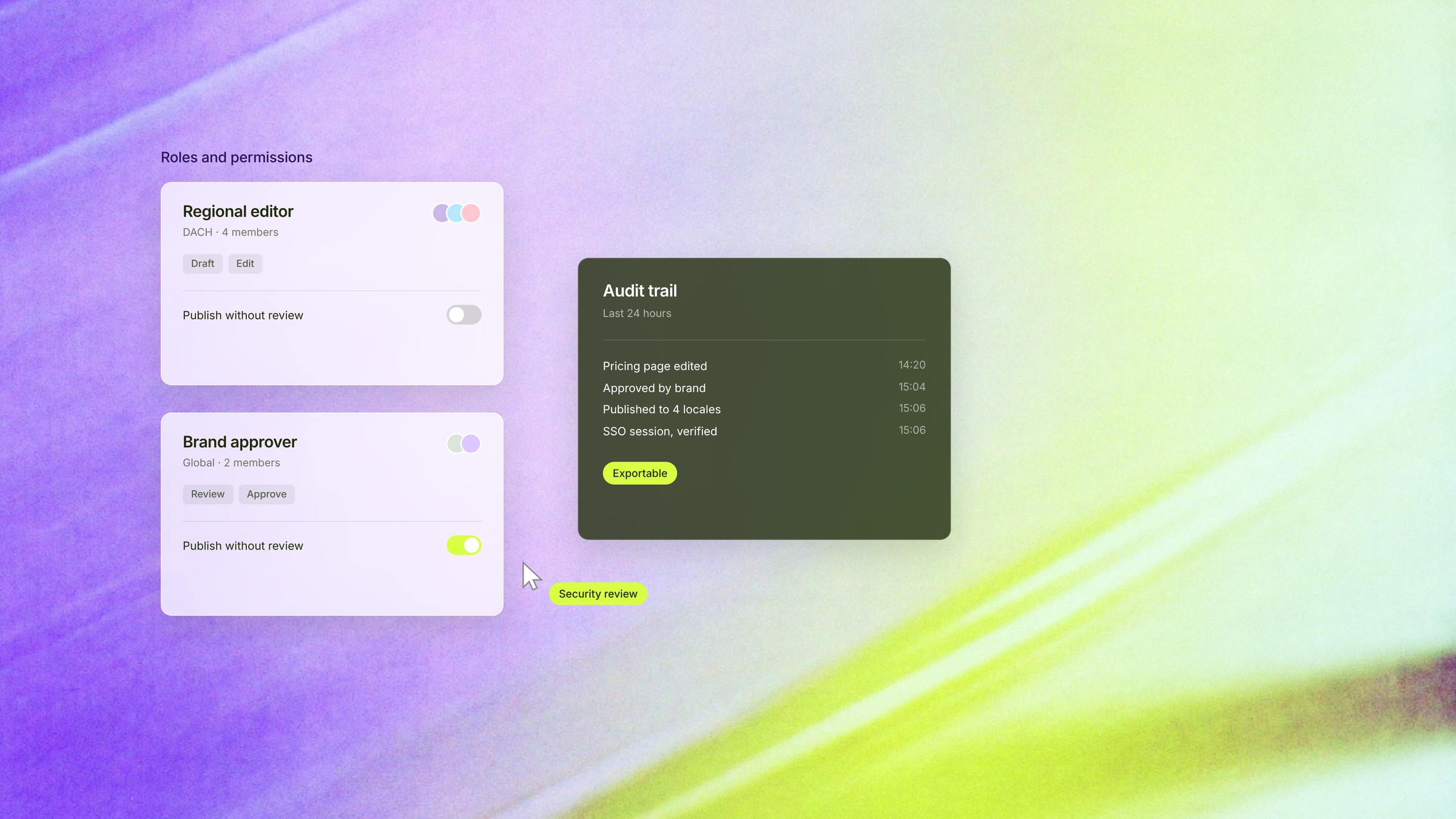
Enterprise security and governance shape CMS choice by determining exactly who can touch what content, and how you'd prove that to an auditor if asked tomorrow.
Role-based access, single sign-on, and a full audit trail matter more than almost any single feature on a spec sheet, because a platform with only two permission levels (admin, and everyone else) is usually the first thing an auditor flags.
A few things worth checking for, beyond the sales pitch:
- Role-based access control, ideally down to brand or regional level, not just one blanket "editor" role for everyone
- Structured approval workflows, so nothing goes live without the right sign-off
- Audit logging, tracking exactly who changed what, and when
- Single sign-on, tying access back to a real identity provider instead of a shared login floating around somewhere
It's also worth clearing up something most teams assume without really testing it: governance and speed aren't actually in conflict, even though it can feel that way when you're stuck in an approval queue.
Once marketers get a properly permissioned visual workspace instead of raw code access, the whole equation shifts:
- Routine content changes ship without a developer in the loop at all
- Developers spend their time hardening the platform instead of reviewing every small edit
- Nothing publishes without passing through the approval workflow that's already in place
For enterprise-scale Webflow projects, this is usually where security review and procurement enter the picture, well before launch. It's a far better conversation to plan for early than to be blindsided by later in the project.
Good, security is handled, but let's zoom out a little.
Where does all of this leave you once you actually need to grow?
How does CMS architecture support scale and multi-site growth?
CMS architecture supports scale by keeping the things that change constantly (content, campaigns) separate from the things that barely change at all (infrastructure), so a traffic spike on one property doesn't take the whole company's web presence down with it.
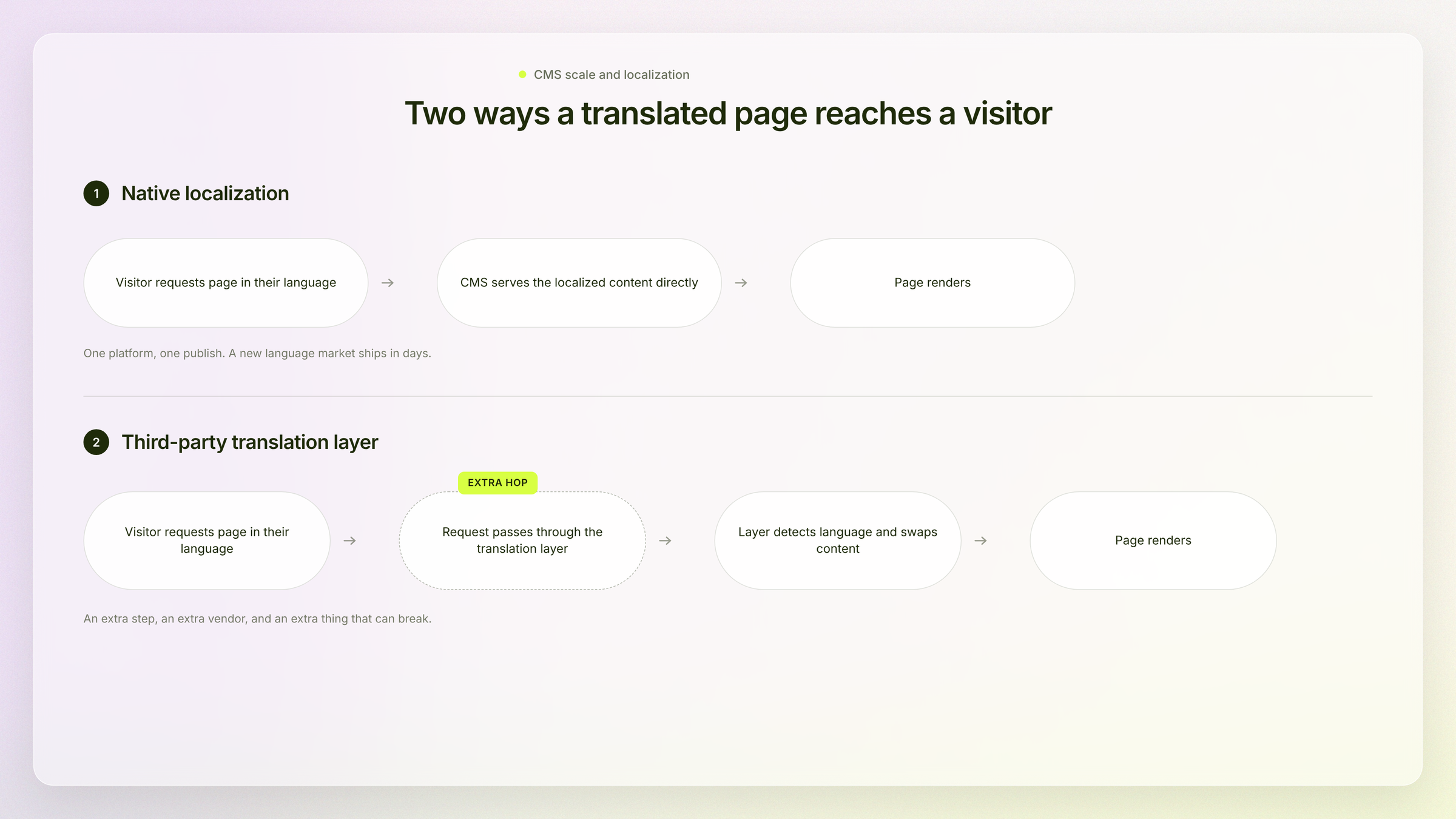
For multi-language growth specifically, native localization now lets a marketing team launch an entirely new language market in days, without relying on developers at all.
What that separation actually buys you at scale:
- A CDN handling delivery, so traffic spikes get absorbed instead of crashing the origin server
- Centralized digital asset management, so nobody's hunting for the current logo file across six different folders
- Real-time collaboration tools, so distributed regional teams aren't overwriting each other's work
- Authoring and public traffic kept on separate rails, so editorial work never slows down the live site (or the other way around)
How should enterprise teams handle multi-language and multi-site growth?
Enterprise teams handle this by choosing localization tools that match how often new markets actually launch, then applying that same governance logic to every property, not just the language layer.
On the language side specifically, we've worked with both Webflow's native localization and third-party layers like Weglot, and I can say that the gap between them is real.
With native localization built straight into the platform, a marketing team can spin up an entirely new language market on their own, in a matter of days, with no developer required.
Which is a very different way of operating than routing every new market through a translation vendor and a development queue.
Multi-site governance runs on the same underlying logic, just at a bigger scale. Centralize whatever has to stay consistent (brand, compliance, core structure), and hand off whatever doesn't (local content, regional campaigns).
Which brings us to the last piece of the process and it's the one that's entirely human.

How do you solve the CMS learning curve without losing power?
You solve the CMS learning curve by matching the editing tools to the people actually doing the publishing, not the people who built the platform.
- Marketing teams need drag-and-drop simplicity for routine updates.
- Developers need full control over components and data.
If you get this balance wrong, and a simple headline swap turns into a developer ticket, which is exactly where shadow workflows start creeping in.
We saw this play out firsthand with Primer, well before they became a StanVision client.
Their team was running on Craft CMS, and something as small as swapping a line of website copy meant waiting roughly two weeks for a developer to get to it.
Well, try running an active marketing calendar on that timeline (no… you really can't).
Their own website had basically stopped functioning as a usable marketing tool. Since the move to Webflow, that same team now ships a brand-new campaign page in about a day, entirely on their own.
Final thoughts
To be completely honest, every CMS on the market can do more than your team will ever use.
"What can this platform do" was never the useful question.
The real useful question is narrower: what does your team actually need to publish, update, and ship without waiting on someone else to do it for them. Most CMS regret traces back to a team that never honestly answered that question before signing anything.
I've never had a client who scoped things properly upfront call me eighteen months later asking why marketing still can't publish a page on its own.
So if you're mid-evaluation and want someone to look over your requirements list before you sign anything, book a call with our team and we'll go through it together.
Frequently asked questions
How do enterprise tech companies typically approach CMS selection?
Enterprise tech companies typically start with a requirements audit before any vendor demo, mapping who publishes, how often, and which systems the CMS has to connect to. From what we've seen across our clients, the shortlist only gets built after that audit, not before. This flips the usual order, where procurement compares feature sheets first and finds the gaps once daily publishing starts. It also shortens the evaluation cycle, since fewer platforms make it to a final demo.
What's the difference between a CMS and a digital experience platform (DXP)?
A CMS manages content. A DXP is a broader set of technologies for composing, managing, delivering, and optimizing full digital experiences. So in practice, a DXP bundles CMS functionality with personalization, marketing automation, and experience orchestration in one suite. Enterprises choose a DXP when they want a single vendor covering that whole stack, and a CMS plus best-of-breed tools when they'd rather swap pieces independently.
Should enterprise teams choose an open source or vendor-managed CMS?
Open source gives enterprise teams full control and no licensing fees, but it shifts hosting, security patching, and upgrade work onto internal or agency teams. Vendor-managed platforms trade that control for predictable support and less operational overhead. The right choice usually comes down to whether the organization has the engineering capacity to own infrastructure long-term. Teams without dedicated DevOps resources tend to underestimate this cost until the first major security patch lands.
How does CMS choice affect conversion and the customer journey?
CMS choice affects conversion mainly through personalization capability: platforms that expose content as structured, queryable data can feed a customer data platform in real time, while page-locked platforms need manual work for every variant. This matters across the full customer journey, not just the landing page, since disconnected personalization tools create content that drifts out of sync with what a CDP knows about a visitor. So enterprises prioritizing conversion should weigh personalization architecture alongside editorial features.
How long does an enterprise CMS migration typically take?
A realistic timeline for a full enterprise redesign and migration is around four months, though this depends heavily on content volume and how much rework the old content needs. We always monitor Google Analytics 4 and Search Console after launch specifically to confirm traffic and rankings hold.

Stan Kirilov
Stan has led design for over 20 years, first as a hands-on designer, now as Experience Director at StanVision. He works with SaaS and fintech companies, from first-time founders to global brands, on products and websites built to convert, not just to look good.
He serves on the Awwwards jury and still reviews every project that ships. His standard is simple: if a design doesn't perform, it isn't finished.

.svg)